Using the Sysload module
The Sysload module consists of the following files stored in the directory pxsysload:
Sysload module API
The following public functions are declared in the module’s header file pxsysload.h:
   PxError_t PxSysloadCalibrate(PxTicks_t time);
   PxInt_t PxSysloadStartMeasure(void);
   PxInt_t PxSysloadGetMeasure(PxInt_t *Avg);
   PxInt_t PxSysloadEnd(void);
Public functions
- PxSysloadCalibrate
-
Initializes the CPU load measurement and starts the calibration. It must be called from the InitTask after the PXROS-HR tick is initialized and started but before user tasks or handlers are created. This function creates and starts the Delay Job.
The input parameter sets the CPU load measurement period. This argument also defines the duration of the initial calibration measurement.
- PxSysloadStartMeasure
-
Starts the CPU load measurement. It must be called from the InitTask only after the
PxSyloadCalibrate()has been called and after the InitTask becomes an idle task. The function indefinitely blocks the caller and will only return if there is an error orPxSyloadEnd()stops the measurement. - PxSysloadGetMeasure
-
Returns the load of the CPU from which the function has been called. The caller must have read access to the Sysload data structure.
- PxSysloadEnd
-
Stops the CPU load measurement on a given CPU. Any task having write access to the Sysload data structure can call this function.
Task access rights
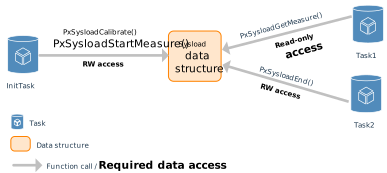
To use the Sysload module functions, the tasks need either read-only or read-write access to the global Sysload structure. The following picture shows an example setup with the InitTask and two user tasks together with the required access rights to the Sysload data structure. It is assumed that Task1 is only the CPU load measurement reader while the Task2 is able to terminate the measurement (which also releases the delay job object).
More details on using the Sysload module in the application can be found in the TC39x PXROS-HR CPU Load Example - Quick Guide.