Termination
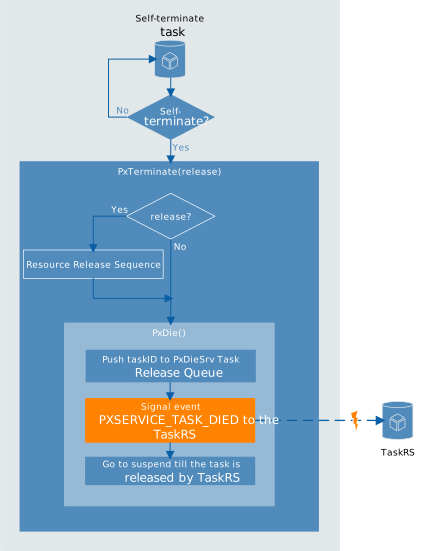
This section covers the types of terminations that the PXROS-HR API provides. The first of them is self-termination allowing a task to be terminated by its own decision by calling PxDie() or PxTerminate(release) PXROS-HR API functions. The second option is forced termination, which means that one task can terminate ("kill") another task without its consent by calling PxTaskForceTermination(taskId) with the argument being the ID of the task to be terminated..
Self-termination
PxDie()
For a successful PxDie() call, the Task Release Service must exist.
The function ensures the task will no longer accept messages to its private task mailbox (sends to this mailbox are suppressed). The mailbox is then cleared by releasing the messages one by one. If any release fails, the message is put back in the mailbox, and PxDie() stops further execution and returns an error.
PxDie() ensures the task ID is put to the PxDieSrv Task Release Queue and sends the PXSERVICE_TASK_DIED event to the Task Release Service, which ensures its termination. PXSERVICE_TASK_DIED is a reserved event ID defined in the "pxdef.h" header file.
Task Release Service is responsible for calling PxDieService() when the PXSERVICE_TASK_DIED event is received to clean up the task system context.
PxTerminate(bool release)
According to the release parameter, the function releases (or not) the objects allocated by the terminating task and then calls PxDie().Note that PxTerminate(false) is equivalent to PxDie(). Not all the objects can be released. There is a Resource Release Sequence — a sequence of steps releasing the resources allocated by the task. If any particular release operations fail, the PxTerminate(true) stops further execution and returns an error.
Resource Release Sequence consists of:
-
Release all messages (
PxMsgReleaseAllMsg()) -
Clear private mailbox — call message receive and message release for the messages waiting in the mailbox until there is no message inside the private mailbox. If any release fails, the message is put back in the mailbox.
-
Release all system objects that were requested by the calling task to object pools (
PxSysObjReleaseAllObjects()). Only the following list of objects types is released by this function:-
Timeout objects
-
Periodic events objects
-
Delay objects
-
Mailbox objects — release all messages that are inside the mailbox, and then the mailbox
-
Task objects — all subtasks are force-terminated, but the task objects are not released
-
-
Return all allocated blocks to memory classes (
PxMcReturnAllBlks())
The following objects are not released in the Resource Release Sequence:
-
Object pools objects
-
Interrupt objects
-
Memory class objects
-
Task objects
The resources that are not released, e.g. memory class, should still be valid and work properly. The user should avoid creating nonreleasable objects in terminable tasks, as mentioned in Limitations.
Forced termination
PxTaskForceTermination(PxTask_t taskId)
PXROS-HR API also offers a way how to terminate other tasks. The caller of PxTaskForceTermination(taskId) must be the direct creator of the task to terminate (parent). The task that is forced to be terminated has no option for how to react to this action.
For calling PxTaskForceTermination(taskId), the task needs these access rights: PXACCESS_SYSTEM_CONTROL
Forced termination is not transitive! See the following scheme:
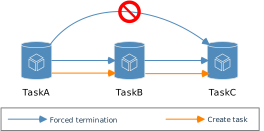
TaskA can terminate taskB. TaskB can terminate taskC. But taskA cannot terminate taskC! But while taskA terminates taskB, all the taskB subtasks are also terminated, and their subtasks (all the descendants of the terminated task are also assigned to be terminated).
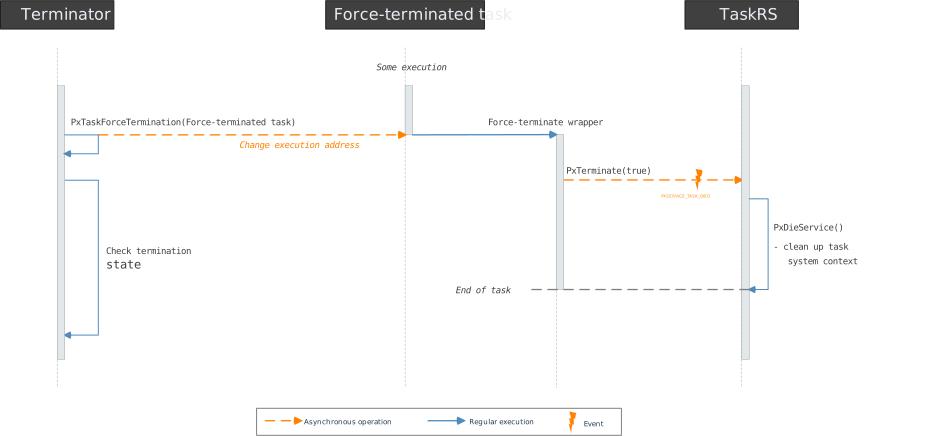
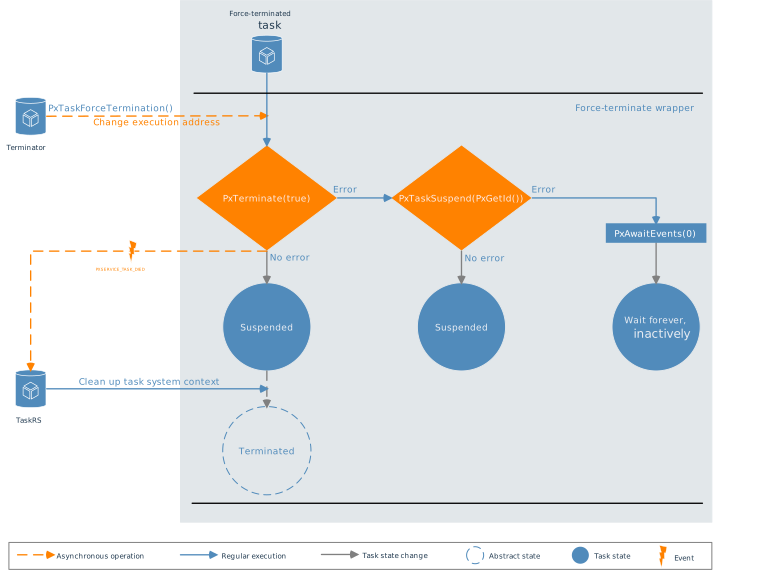
PxTaskForceTermination(taskId) forces the task with ID taskId by changing its execution address to a force-termination wrapper.
The wrapper function first tries to call PxTerminate(true) for self-termination. If the PxTerminate(true) is not successful (returns an error code), the error code is ignored, and the task calls PxTaskSuspend(PxGetId()) to get suspended (prevent a task from being scheduled). If it is also unsuccessful, the error code is ignored, and the task calls PxAwaitEvents(0) and waits forever, inactively. The wrapper does not have any return in any case.
-
Terminated — the task no longer exists
-
Suspended — task exists but is prevented from being scheduled
The wrapper function is processed when the task that is going to be terminated gets the time to run. The forced termination is an asynchronous operation, so the task is not guaranteed to be really terminated, and the termination state can be checked explicitly. The termination can fail, which means that some objects may not be released and will never be.
Priority influence
The following section assumes that TaskRS is a higher-priority service than application tasks. Otherwise, it would also depend on TaskRS priority.
If the task that is forced to be terminated has higher priority, the actions are made immediately. It means that the result of the termination is known even before the return from PxTaskForceTermination(taskId). However, the information about the success of the termination must be checked explicitly.
The termination is processed when the specific task gets its execution time. Due to the asynchronous nature of the forced termination, the result is not known immediately and must be checked explicitly.
Checking the termination state
The user can check whether the task was terminated with PxTaskCheck(taskId). If the function returns false, the task is no longer valid, meaning it was successfully terminated. If the task is still valid, getting its state with PxSysInfoGetTaskInfo is possible.
Due to the asynchronous nature of the terminating task execution, the PxTaskCheck(taskId) will need to be made periodically in the loop with a timeout if we want to wait till the task is actually terminated. An example of such waiting implementation is shown in Check termination state.
/* Do the forced termination of the created task */
errRes = PxTaskForceTermination(forceTerminateTask);
if (errRes != PXERR_NOERROR)
    PxPanic();

/* Check termination state */
errRes = HtcCheckTermination(forceTerminateTask, 0, 0, EVENT_WAIT_TIMEOUT);
if (errRes != PXERR_NOERROR)
{
    if (errRes == PXERR_REQUEST_TIMEOUT)
    {
        errRes = PxSysInfoGetTaskInfo(&taskInfo, forceTerminateTask);
        if (errRes != PXERR_NOERROR)
            PxPanic();

        if (   taskInfo.PxInfoTask_State == TaskState_Suspended
            || taskInfo.PxInfoTask_State == TaskState_Suspended_PxAwaitEvents)
        {
            /* The task was not terminated successfully within the given amount of time,
             * but was suspended */
            PxPanic();
        }
        else if (taskInfo.PxInfoTask_State == TaskState_Waiting_PxAwaitEvents)
        {
            /* The task was not terminated successfully, nor suspended successfully,
             * waits forever inactively */
            PxPanic();
        }
    }
}
else
{
    /* Create the task again - restart it */
    forceTerminateTask = ForceTerminateTask_Create(FORCETERMINATETASK_PRIO, 0,
                                                   PXMcTaskdefault,
                                                   PXOpoolTaskdefault);
    if (PxTaskIdError(forceTerminateTask) != PXERR_NOERROR)
        PxPanic();
}
Task restart
Restarting refers to terminating a task and then creating it again. If the restart involves forced termination, no additional logic is needed. The parent task can always check the status of the terminated task. However, for self-restart, which includes self-termination, the user needs to incorporate extra logic to handle task creation again.
The application should be designed to be aware that tasks can be terminated. Users should employ appropriate communication patterns to react appropriately when interactions with the released task cease to function.
For instance, when using "await release" to retrieve data from the receiver via a message (e.g., return values), the message can be released during task termination even before processing it. Therefore, the user must ensure proper differentiation between a valid response and an "invalid/not correctly processed" response.