PXROS time slicing implementation
Each task possesses a time slicing attribute specified in ticks. When set to zero (the default value), time slicing is disabled.
Task with disabled time slicing
If the time slicing parameter is set to zero, which is also the default value, the time slicing is not used. In such a scenario, when two tasks share the same priority, only one will be actively executing while the other one will remain dormant. The other task will not be given an opportunity to run unless the active task encounters a situation where it needs to wait for a specific event or condition.
Task with enabled time slicing
When the time slicing value is set to a non-zero value, it defines the duration, measured in ticks, for which a task remains in an active state before the kernel moves it to the end of the ready queue associated with its corresponding priority level. In simpler terms, it sets the time limit for each task’s execution before it temporarily yields control to other tasks.
Suppose there are multiple tasks with the same priority level. In such a scenario, the kernel employs a round-robin scheduling scheme to ensure fair execution. The tasks are arranged in a ready queue, waiting for their turn to be executed. When a task’s time slice elapses, meaning it has been actively running for the specified number of ticks, the kernel places that task at the end of the ready queue.
The kernel scans the ready queue and checks if there are other tasks at the same priority level that are ready and not suspended. If it finds another task, it schedules it for execution, allowing it to run for its own time slice duration. This process continues, with each task receiving its limited amount of CPU time according to their respective time slicing values.
It’s important to note that the time slicing value can vary from task to task. This flexibility allows different tasks to have distinct time slice durations, enabling fine-grained control over their execution patterns. Some tasks may require longer periods of uninterrupted execution while the other ones may accept more frequent context switching.
Time slicing use case
Time slicing can be effectively utilized in scenarios where multiple low-priority tasks need to run concurrently within a while(1) loop, without invoking any blocking functions. Consider a situation where certain tasks involve lengthy computations or continuous polling operations. By assigning these tasks the same priority level and configuring appropriate time slice values, it becomes possible to allocate CPU time to each task in a fair and controlled manner.
In such cases, if all higher priority tasks are in a waiting state, the lower priority tasks with non-zero time slices will be eligible for execution. The kernel will schedule these tasks based on their respective time slice allocations, expressed in ticks. As a result, the lower priority tasks will run in a round-robin fashion, ensuring that each task receives its fair share of CPU time according to its time slice portion.
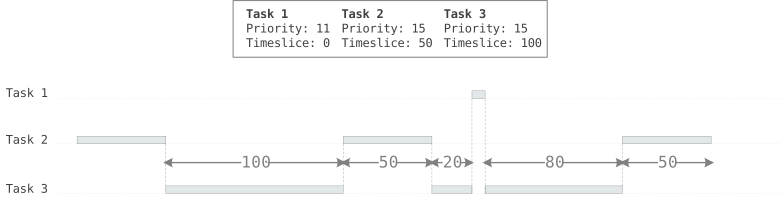
Below is a simple diagram illustrating the time slicing of two tasks with identical priority (Task 2 and Task 3). These tasks are intermittently interrupted by another task (Task 1) with a higher priority where time slicing is disabled.
Good to know
- Not running task
-
If the task is not running, the time slice is not consumed (the time slice defines the active time dedicated for the task for "one round")
Note: Not running task refers to a task that is currently not executing on the CPU. This could be because the task is suspended, it has not been scheduled due to low priority, or is waiting for an event or resource to become available.
- Timeslicing value
-
The time slicing value can be set during task creation or during runtime by
PxSetTimeslices()[1]. - Timeslicing scheduling
-
The time slicing is evaluated on given priority level. If there is higher priority task that became ready, it will preempt the lower priority tasks, including potentially the time sliced tasks. Even if the higher priority task will have time slicing set, it will not prevent this task to run forever. It means, time slicing alone does not give any guarantee that time sliced tasks will be running. The application design must ensure that all tasks have chance to run, i.e, the higher priority task must voluntarily call blocking functions which make the tasks waiting.
- Single task per prioity
-
If there is only one task with time-slicing enabled at a given priority, the behavior is the same as if time-slicing were not enabled. A never-ending task will run indefinitely until it is interrupted by another task with a higher priority.
- Scheduling use case of two tasks
-
If two tasks with equal priority are set to run continuously without entering a waiting state, and one task has time-slicing enabled while the other does not, the execution depends on which task starts first. If the task with time-slicing is initiated first, it will process only for its designated time-slice duration before yielding the CPU to the other task. Once the non-time-sliced task starts running, it will monopolize the CPU without interruption, since it lacks the time-slicing mechanism that would otherwise stop executing after the time slice is consumed. Conversely, if the non-time-sliced task runs first, the task with time-slicing will never get an opportunity to execute, as it will never receive CPU time.