Task Termination in PXROS-HR: Application Note
Terms & Abbreviations
- TaskRS
-
Task Release Service implemented as a dedicated task
- Task system context
-
Task information needed by the system (e.g. stacks, task control block, task object)
Introduction
This document provides a context of how to use PXROS-HR API functions to terminate a task. There are two possible options for achieving it: self-termination and forced termination (done by another task). The document describes the limitations when the user wants such behaviour and what the issues are with restarting a task (terminating and then creating again). For use inside of an application, see TC39x Task Termination Example available from HighTec Content Manager.
Task termination applies to each core separately, meaning every core using task termination must have a running Task Release Service. For forced termination (one task terminates another task), the termination requester must be the owner (parent) of the task to be terminated. This requirement also guarantees the existence of these tasks on the same core as it is not possible to create a task on a different core than the requester task’s core.
Task termination is an asynchronous operation consisting of several steps done by different components.
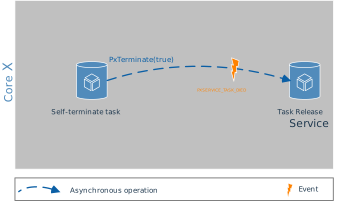
Self-termination components:
-
Terminable task — a task that is going to terminate itself
-
Task Release Service — task responsible for cleaning up the terminated task system context
The terminable task calls PxTerminate(true) to release all resources allocated by the task. Then PxTerminate() calls PxDie() in the process, which is responsible for signaling the PXSERVICE_TASK_DIED event to the Task Release Service. Task Release Service then cleans up (releases) all the task system context.
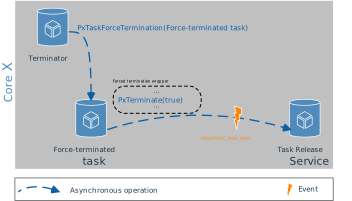
Forced termination components:
-
Terminator task — task terminating another task
-
Terminable task — a task that is going to be terminated
-
Task Release Service — task responsible for cleaning up the terminated task system context
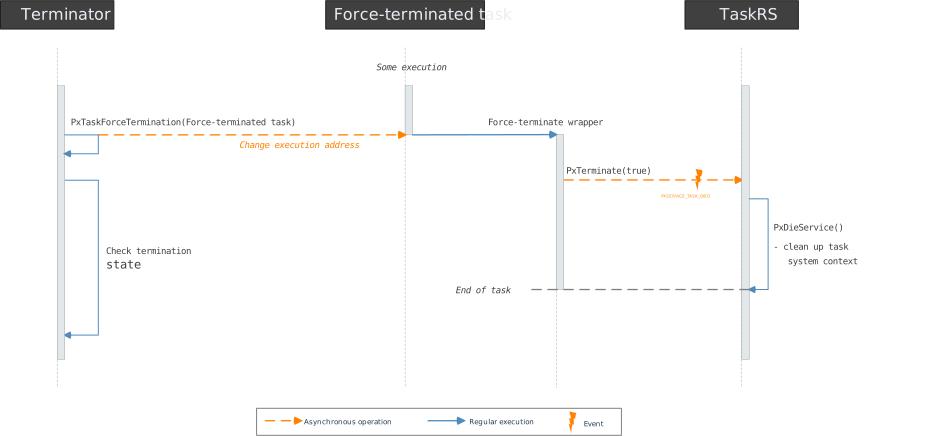
The terminator task calls PxTaskForceTermination(TerminableTaskID) to kill the terminable task. The terminable task is forced to execute a force-termination wrapper to terminate itself. This wrapper calls PxTerminate(true) to release all resources allocated by the task, then calls PxDie(), which is responsible for signaling the PXSERVICE_TASK_DIED event to the Task Release Service. Task Release Service then cleans up (releases) all the task system context.
Chapter Termination provides more details about the task termination.
Task Release Service
The Task Release Service is a custom user-implemented service responsible for cleaning up the task system context of the tasks terminated by the PxDie() function. The PXROS-HR requires assigning a task as a service task, so the kernel can signal the PXSERVICE_TASK_DIED event to the service task when a task dies.
The Task Release Service has to be started on each core where tasks are intended to be terminated. A task must be assigned as a service task by calling PxServiceTaskInit(), which means that it starts receiving PXSERVICE_TASK_DIED events that are signaled from successful PxDie() calls.
For calling PxServiceTaskInit(), a task must have PXACCESS_SYSTEM_CONTROL task access rights.
The dedicated task implementation
In this case, the Task Release Service is a dedicated task responsible for cleaning up the task system context of the tasks terminated by the PxDie() function. The TaskRS sample implementation, including source code, is part of Utilities supplied with OS installer and can be linked to the project as a source code or library called libtaskrelsrv.a.
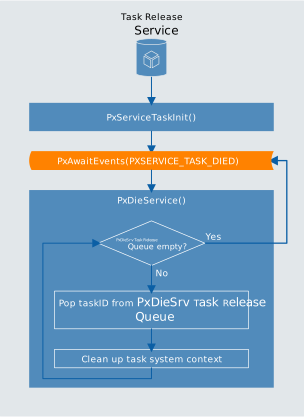
The TaskRS has to be started on each core where tasks are intended to be terminated and is responsible for calling the function PxDieService() when the kernel signals by the event PXSERVICE_TASK_DIED that a task has been terminated.
The TaskRS calls PxServiceTaskInit() to announce itself as the service task. This service task will get events to clean up the task system context after a task dies.
Priority influence
The terminated tasks are cleaned after the PXSERVICE_TASK_DIED event is signaled, and the TaskRS gets execution time to process the event. TaskRS is subjected to the same scheduling rules as any other task in the system. Hence, its priority will have a major impact on the delay between the task termination request and the actual cleanup.
Sample implementation
The task-release utility implementation contains a function to create the TaskRS So every core using task termination must first create the task by calling the TaskReleaseService_TaskCreate(priority, events).
static void TaskReleaseService_Task (PxTask_t myId, PxMbx_t myMbx, PxEvents_t actEv)
{
    PxError_t err;

    (void)myId;
    (void)myMbx;
    (void)actEv;

    /* Announce itself as a service task
     * the service task will get events to handle
     * the garbage collection after a task died.
     */
    err = PxServiceTaskInit();
    if (err != PXERR_NOERROR)
    {
        /* The only possibility for a failure maybe
         * PXERR_ACCESS_RIGHT:            Task does not have the right
         *                                PXACCESS_SYSTEM_CONTROL
         * PXERR_TASK_DIESRV_INITIALIZED: Another task is already installed as a service
         *                                task
         * Sleep forever
         */
        PxAwaitEvents(0);
    }

    while (1)
    {
        PxEvents_t Ev;

        /*
         * Wait for the event to support task termination
         */
        Ev = PxAwaitEvents(PXSERVICE_TASK_DIED);

        if (Ev & PXSERVICE_TASK_DIED)
        {
            /*
             * A task has died do the garbage collection
             */
            err = PxDieService();
            if (err != PXERR_NOERROR)
            {
                /* An error could only occur if the internal object handling is
                 * defect (which should never occur) or if the memory classes
                 * of the died task's stack or TCB is corrupted.
                 */
                PxPanic();
            }
        }
    }
}
The following code shows how to create TaskRS in HighTec`s examples. The modified code is based on the TC39x PXROS-HR BSP example. Examples are available from the HighTec Content Manager. The TaskRS is created in the Init task, which is responsible for the application’s initialization.
...

/* Wait for the NameServer service task on MASTER_CORE to get initialized.*/
PxError_t errRes = PxGetGlobalServerMbx (PXROS_MASTER_CORE, _PxNameSrvReqMbxId);
if (errRes != PXERR_NOERROR)
    PxPanic();

/* Create the TaskRS */
PxTask_t releaseService = TaskReleaseService_TaskCreate(TASK_RELEASE_SERVICE_PRIO,
                                                        (PxEvents_t) 0);
if (PxTaskIdError(releaseService) != PXERR_NOERROR)
    PxPanic();

/* User Task Deployment
* --------------------
* here each core creates and activates their own set of user tasks
* defined in Task Deployment Table
*/
TaskDeploy(coreId);

...
PxDieService()
PXROS-HR uses a queue (FIFO) of task IDs to be released — "PxDieSrv Task Release Queue" will be used in the following text. This queue is used only by the kernel.
PxDieService() goes through the PxDieSrv Task Release Queue until there is no task to be released, and for each such task, cleans up the task system context. The following steps are done:
-
Invalidates the task
-
Release the task’s private mailbox
-
Remove any allocated task stack memory
-
Remove any allocated task interrupt stack memory
-
Release the stack for the abort mechanism if not null
-
Return the task control block
-
Release the task object
Termination
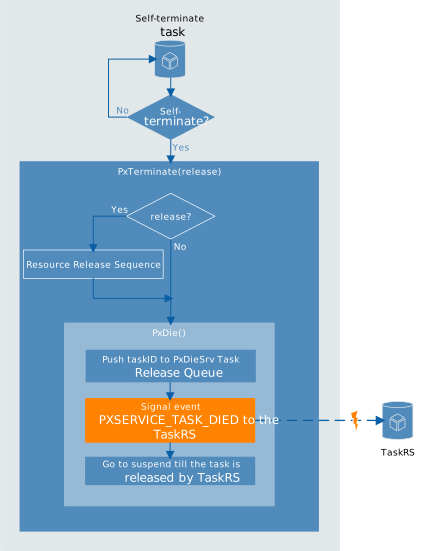
This section covers the types of terminations that the PXROS-HR API provides. The first of them is self-termination allowing a task to be terminated by its own decision by calling PxDie() or PxTerminate(release) PXROS-HR API functions. The second option is forced termination, which means that one task can terminate ("kill") another task without its consent by calling PxTaskForceTermination(taskId) with the argument being the ID of the task to be terminated..
Self-termination
PxDie()
For a successful PxDie() call, the Task Release Service must exist.
The function ensures the task will no longer accept messages to its private task mailbox (sends to this mailbox are suppressed). The mailbox is then cleared by releasing the messages one by one. If any release fails, the message is put back in the mailbox, and PxDie() stops further execution and returns an error.
PxDie() ensures the task ID is put to the PxDieSrv Task Release Queue and sends the PXSERVICE_TASK_DIED event to the Task Release Service, which ensures its termination. PXSERVICE_TASK_DIED is a reserved event ID defined in the "pxdef.h" header file.
Task Release Service is responsible for calling PxDieService() when the PXSERVICE_TASK_DIED event is received to clean up the task system context.
PxTerminate(bool release)
According to the release parameter, the function releases (or not) the objects allocated by the terminating task and then calls PxDie().Note that PxTerminate(false) is equivalent to PxDie(). Not all the objects can be released. There is a Resource Release Sequence — a sequence of steps releasing the resources allocated by the task. If any particular release operations fail, the PxTerminate(true) stops further execution and returns an error.
Resource Release Sequence consists of:
-
Release all messages (
PxMsgReleaseAllMsg()) -
Clear private mailbox — call message receive and message release for the messages waiting in the mailbox until there is no message inside the private mailbox. If any release fails, the message is put back in the mailbox.
-
Release all system objects that were requested by the calling task to object pools (
PxSysObjReleaseAllObjects()). Only the following list of objects types is released by this function:-
Timeout objects
-
Periodic events objects
-
Delay objects
-
Mailbox objects — release all messages that are inside the mailbox, and then the mailbox
-
Task objects — all subtasks are force-terminated, but the task objects are not released
-
-
Return all allocated blocks to memory classes (
PxMcReturnAllBlks())
The following objects are not released in the Resource Release Sequence:
-
Object pools objects
-
Interrupt objects
-
Memory class objects
-
Task objects
The resources that are not released, e.g. memory class, should still be valid and work properly. The user should avoid creating nonreleasable objects in terminable tasks, as mentioned in Limitations.
Forced termination
PxTaskForceTermination(PxTask_t taskId)
PXROS-HR API also offers a way how to terminate other tasks. The caller of PxTaskForceTermination(taskId) must be the direct creator of the task to terminate (parent). The task that is forced to be terminated has no option for how to react to this action.
For calling PxTaskForceTermination(taskId), the task needs these access rights: PXACCESS_SYSTEM_CONTROL
Forced termination is not transitive! See the following scheme:
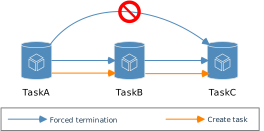
TaskA can terminate taskB. TaskB can terminate taskC. But taskA cannot terminate taskC! But while taskA terminates taskB, all the taskB subtasks are also terminated, and their subtasks (all the descendants of the terminated task are also assigned to be terminated).
PxTaskForceTermination(taskId) forces the task with ID taskId by changing its execution address to a force-termination wrapper.
The wrapper function first tries to call PxTerminate(true) for self-termination. If the PxTerminate(true) is not successful (returns an error code), the error code is ignored, and the task calls PxTaskSuspend(PxGetId()) to get suspended (prevent a task from being scheduled). If it is also unsuccessful, the error code is ignored, and the task calls PxAwaitEvents(0) and waits forever, inactively. The wrapper does not have any return in any case.
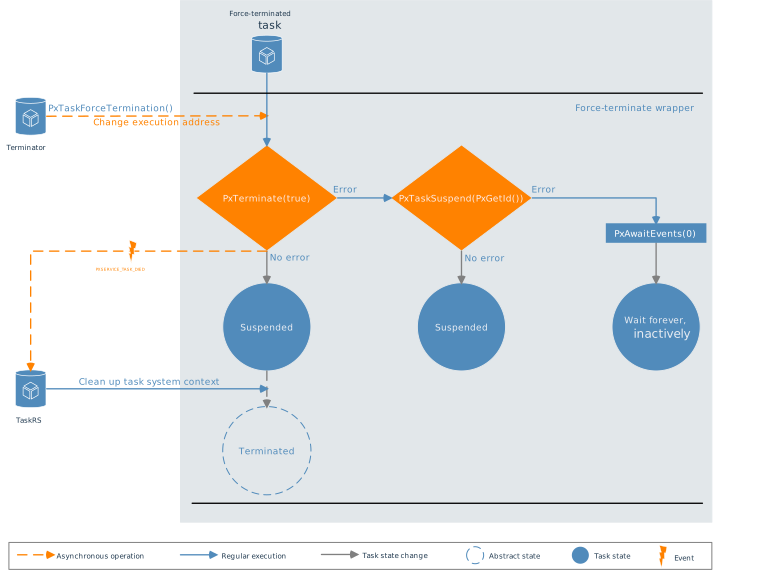
-
Terminated — the task no longer exists
-
Suspended — task exists but is prevented from being scheduled
The wrapper function is processed when the task that is going to be terminated gets the time to run. The forced termination is an asynchronous operation, so the task is not guaranteed to be really terminated, and the termination state can be checked explicitly. The termination can fail, which means that some objects may not be released and will never be.
Priority influence
The following section assumes that TaskRS is a higher-priority service than application tasks. Otherwise, it would also depend on TaskRS priority.
If the task that is forced to be terminated has higher priority, the actions are made immediately. It means that the result of the termination is known even before the return from PxTaskForceTermination(taskId). However, the information about the success of the termination must be checked explicitly.
The termination is processed when the specific task gets its execution time. Due to the asynchronous nature of the forced termination, the result is not known immediately and must be checked explicitly.
Checking the termination state
The user can check whether the task was terminated with PxTaskCheck(taskId). If the function returns false, the task is no longer valid, meaning it was successfully terminated. If the task is still valid, getting its state with PxSysInfoGetTaskInfo is possible.
Due to the asynchronous nature of the terminating task execution, the PxTaskCheck(taskId) will need to be made periodically in the loop with a timeout if we want to wait till the task is actually terminated. An example of such waiting implementation is shown in Check termination state.
/* Do the forced termination of the created task */
errRes = PxTaskForceTermination(forceTerminateTask);
if (errRes != PXERR_NOERROR)
    PxPanic();

/* Check termination state */
errRes = HtcCheckTermination(forceTerminateTask, 0, 0, EVENT_WAIT_TIMEOUT);
if (errRes != PXERR_NOERROR)
{
    if (errRes == PXERR_REQUEST_TIMEOUT)
    {
        errRes = PxSysInfoGetTaskInfo(&taskInfo, forceTerminateTask);
        if (errRes != PXERR_NOERROR)
            PxPanic();

        if (   taskInfo.PxInfoTask_State == TaskState_Suspended
            || taskInfo.PxInfoTask_State == TaskState_Suspended_PxAwaitEvents)
        {
            /* The task was not terminated successfully within the given amount of time,
             * but was suspended */
            PxPanic();
        }
        else if (taskInfo.PxInfoTask_State == TaskState_Waiting_PxAwaitEvents)
        {
            /* The task was not terminated successfully, nor suspended successfully,
             * waits forever inactively */
            PxPanic();
        }
    }
}
else
{
    /* Create the task again - restart it */
    forceTerminateTask = ForceTerminateTask_Create(FORCETERMINATETASK_PRIO, 0,
                                                   PXMcTaskdefault,
                                                   PXOpoolTaskdefault);
    if (PxTaskIdError(forceTerminateTask) != PXERR_NOERROR)
        PxPanic();
}
Task restart
Restarting refers to terminating a task and then creating it again. If the restart involves forced termination, no additional logic is needed. The parent task can always check the status of the terminated task. However, for self-restart, which includes self-termination, the user needs to incorporate extra logic to handle task creation again.
The application should be designed to be aware that tasks can be terminated. Users should employ appropriate communication patterns to react appropriately when interactions with the released task cease to function.
For instance, when using "await release" to retrieve data from the receiver via a message (e.g., return values), the message can be released during task termination even before processing it. Therefore, the user must ensure proper differentiation between a valid response and an "invalid/not correctly processed" response.
Limitations
When the environment is designed to allow task termination, several assumptions should be followed.
-
Terminable task should not share its local data (on its stack) with other tasks by using message envelopes or insert it to memory classes, because the stack memory become invalid after terminable task’s termination
-
Terminable tasks should not create objects that cannot be released during the task termination
-
Special attention must be paid to the application design, especially communication patterns and recognition between valid/invalid data. Mainly when expecting a response from a task that could be terminated.
-
Once the task is created again, it will probably have a different ID, so any other tasks that depend on the killed task should use the new ID
Appendix A: Check termination state
The following code is an example implementation of the wait function using a specific amount of retries with a defined timeout not to block other tasks' execution. If the function does not succeed within the given time and retries, the PXERR_REQUEST_TIMEOUT error code is returned.
Assuming the default definitions are defined as follows.
#define TERMINATION_CHECK_RETRY_DEFAULT 10
#define TERMINATION_CHECK_RETRY_TIMEOUT 10/* ~~~~~~~~~~~~~~~~~~~~~~~~~~~~~~~~~~~~~~~~~~~~~~~~~~~~~~~~~~~~~~~~~~~~~~~~~~~~~~~~~~~~~~
* FUNCTION: HtcCheckTermination
* Check the task termination state with the wait/retry option
* IN:
* taskId : ID of the task we want to know the state
* retryCount : number of retries
* 0 = use a default value TERMINATION_CHECK_RETRY_DEFAULT
* retryTimeout : wait time in PX Ticks
* 0 = use a default value TERMINATION_CHECK_RETRY_TIMEOUT
* retryEvent : Caller event to use for retry timeout events
* calling task shall provide the event
* OUT:
* PxError : PXROS type of error code
* ~~~~~~~~~~~~~~~~~~~~~~~~~~~~~~~~~~~~~~~~~~~~~~~~~~~~~~~~~~~~~~~~~~~~~~~~~~~~~~~~~~~~*/
PxError_t HtcCheckTermination(PxTask_t taskId, int retryCount, int retryTimeout,
PxEvents_t retryEvent)
{
PxError_t err = PXERR_NOERROR;
PxBool_t taskAlive = false;
if (!PxTaskIdIsValid(taskId))
return PXERR_TASK_ILLTASK;
/* Check the Default values requests by passing value '0' */
if (retryTimeout == 0)
retryTimeout = TERMINATION_CHECK_RETRY_TIMEOUT;
if (retryCount == 0)
retryCount = TERMINATION_CHECK_RETRY_DEFAULT;
/* Ask for a timeout object from the task default object pool to generate
* wake-up event */
PxTo_t to = PxToRequest(PXOpoolTaskdefault, retryTimeout, retryEvent);
if (PxToIdError(to) != PXERR_NOERROR)
{
err = PxToIdError(to);
return err;
}
/* Retry loop with waiting sleep in between retries */
do
{
taskAlive = PxTaskCheck(taskId);
if (taskAlive == true)
{
PxToStart(to);
PxAwaitEvents(retryEvent);
}
} while (taskAlive == true && (--retryCount > 0));
/* Task is still alive
* Something must be wrong with the complete application
*/
if (retryCount == 0)
err = PXERR_REQUEST_TIMEOUT;
/* Stop and release the temporary timeout object */
PxToStop(to);
PxToRelease(to);
return err;
}Document history
| Version | Date | Changes to the previous version |
|---|---|---|
1.0 |
July 2023 |
Initial version |
1.1 |
November 2023 |
Added information about the force-termination of a suspended task |
Disclaimer
Please Read Carefully:
This document contains descriptions for copyrighted products that are not explicitly indicated as such. The absence of the TM symbol does not infer that a product is not protected. Additionally, registered patents and trademarks are similarly not expressly indicated in this document.
The information in this document has been carefully checked and is believed to be entirely reliable. However, HighTec EDV-Systeme GmbH assumes no responsibility for any inaccuracies. HighTec EDV-Systeme GmbH neither gives any guarantee nor accepts any liability whatsoever for consequential damages resulting from the use of this document or its associated product. HighTec EDV-Systeme GmbH reserves the right to alter the information contained herein without prior notification and accepts no responsibility for any damages that might result.
HighTec EDV-Systeme hereby disclaims any and all warranties and liabilities of any kind, including without limitation, warranties of non-infringement of intellectual property rights of any third party.
Rights - including those of translation, reprint, broadcast, photomechanical or similar reproduction and storage or processing in computer systems, in whole or in part - are reserved. No reproduction may occur without the express written consent from HighTec EDV-Systeme GmbH.
Copyright © 2023 HighTec EDV-Systeme GmbH, D-66113 Saarbrucken. |