TriCore™ Architecture
The TriCore™ processor is the primary processing unit across all generations of the AURIX™ microcontroller family. The HighTec TCF Debugger provides full support for TriCore-based applications, seamlessly handling both single-core and multi-core configurations.
Supported Families
-
AURIX™ TC2xx (1st Generation)
-
AURIX™ TC3xx (2nd Generation)
-
AURIX™ TC4xx (3rd Generation)
-
Note: When developing for the TC4xx family without utilizing auxiliary cores (such as the PPU, CDSP, or SCR), the microcontroller is treated and debugged as a standard TriCore target.
-
Configuration
To debug a standard TriCore application, open your Debug Configuration and navigate to the appropriate tab to set up your executable.
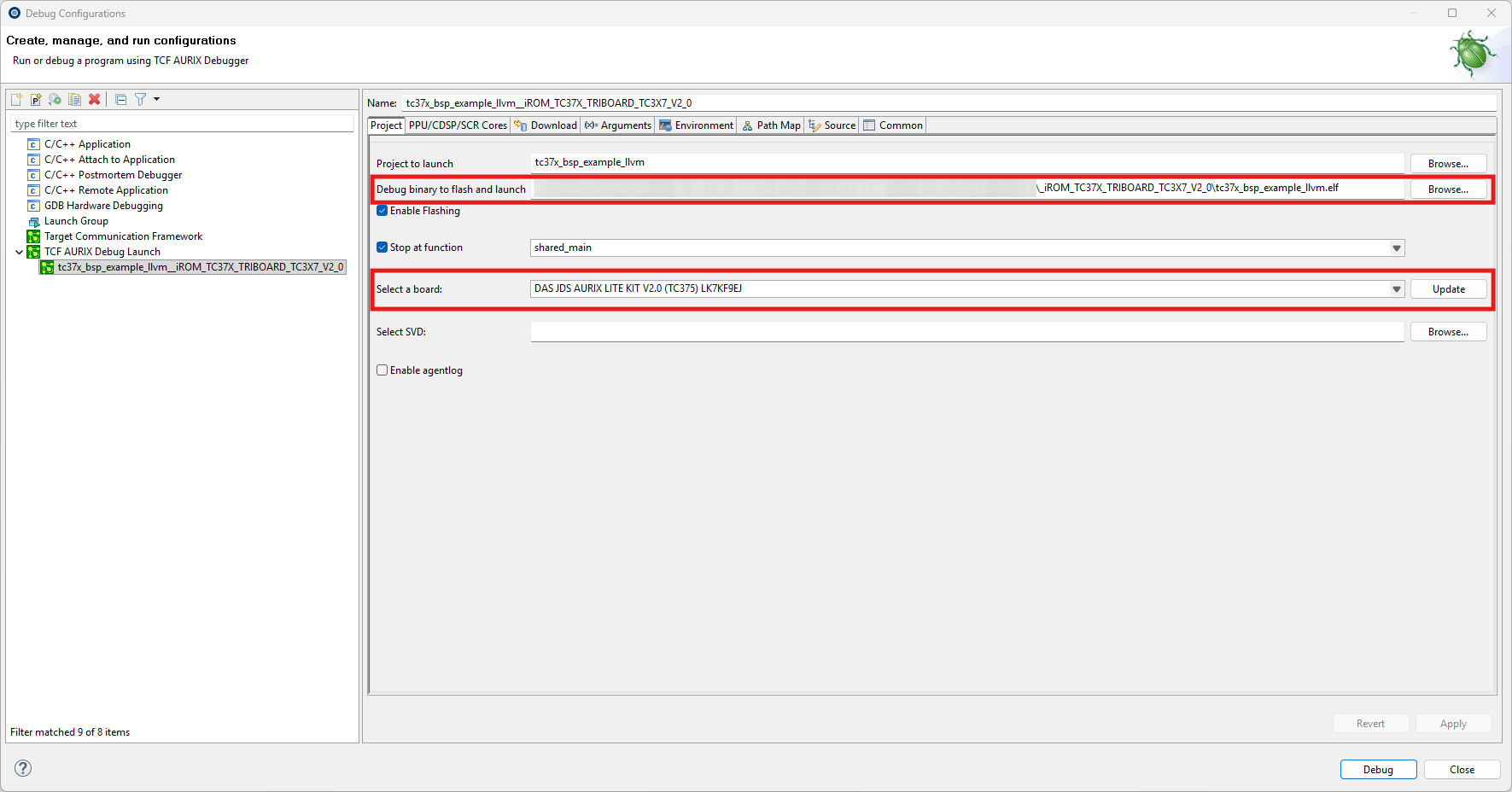
Setup Steps:
-
Executable Path: Browse and select the compiled TriCore
.elffile. -
Hardware Accelerator (Board): Select your connected AURIX board (e.g., DAS JDS AURIX LITE KIT) from the dropdown list.
-
Core Selection (TC4xx only): If you are working with a TC4xx board but only want to debug the TriCore, ensure your core mask is set to only target the TriCore (
c) and ignores the auxiliary cores.